
Webmentions: A short explanation

An explanation of what webmentions are and how they work. A failed attempt at making it not too technical?
I wanted to react to @enocc about his question, but figured I'd take the opportunity to explain webmentions in general.
I'm a developer in my day job, so hopefully this will not become too technical.
What is a Webmention?
Webmentions are a way to notify another site of a mention, this could be a post that links to them, a reaction to something or just a heads up to say you mention them in a blogroll or any other place.
To use webmentions, the receiving site needs to have a webmention endpoint, which is basically a URL that accepts webmention notifications. This can be done via their own site, but often it's a 3rd-party service that handles webmentions for them. The most common one is webmention.io.
The sending site technically doesn't need to have webmention support. But where's the fun in this?
How does it work
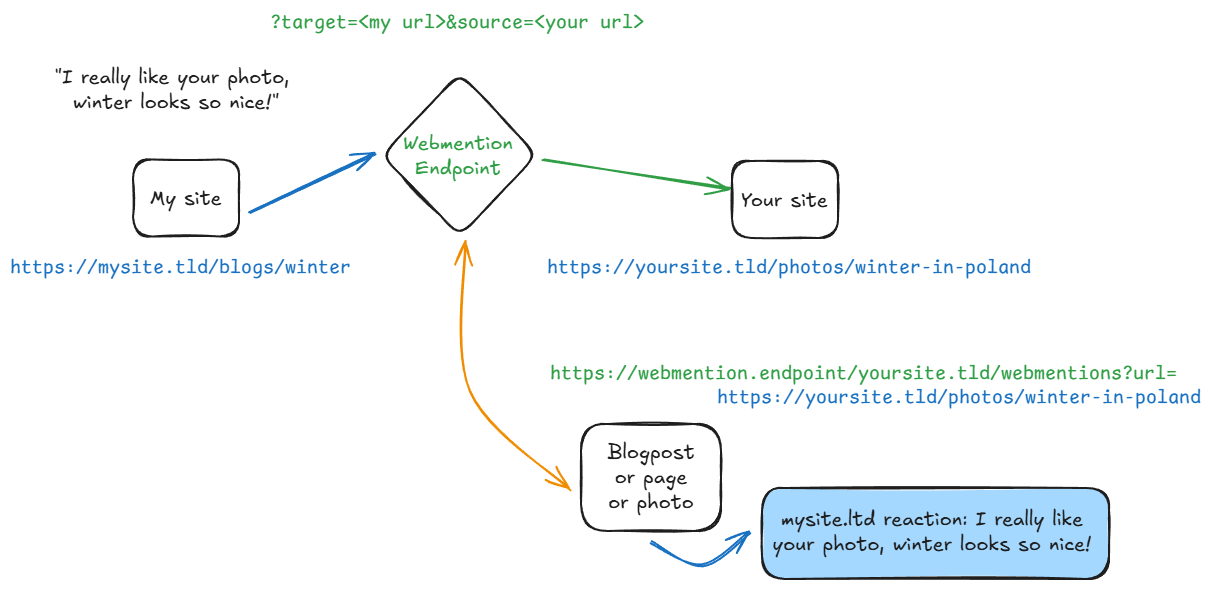
Step 1: We create a page and mention something
So in the above scenario, we've found someone's picture about "Winter in Poland", you create a page on your site and write a response to it. A reply, or maybe you write a blog about winter in your country and you want to link to their picture as well.
Once you've published your post, and the URL for it is available to the public internet, you can use the Webmention Endpoint to send a webmention to Your site from My site.
The webmention endpoint is defined by Your site and is stored in the source code:<link rel="webmention" href="https://webmention.endpoint/yoursite.tld/webmention">. But it could also behttps://yoursite.tld/api/1.0/wm.
The important part is that there's a<link>tag with therel="webmention"attribute.
Step 2: We notify the receiving site, via the webmention endpoint
    // Fake code-like example
    SEND
        source="https://mysite.tld/posts/winter"
        target="https://yoursite.tld/photos/winter-in-poland"
    VIA
        https://webmention.endpoint/yoursite.tld/webmention
In short, we're sending a request to the Webmention Endpoint with two important pieces of information: what is the URL you own, and which URL is it mentioning?
Most endpoints will then verify if the
sourceURL actually exists and whether it links to thetargetURL. That's technically enough to adhere to the official specification.But some endpoints can also check if you as a user have not blocked the sending domain, they can send you a webhook, which can be used to notify you on any device.
Step 3: The receiving site processes the webmention
This last part is optional, but is of course the fun part about webmentions.
Once Your site receives the webmention, it can process it in any way it wants. It could just store it for logging purposes, but often it's used to create a visible reaction on the target page.
In the case of webmention.io, you can use some Javascript to fetch and display the webmentions on your page. For the Wordpress implementation, I believe, it just handles as if it were a normal comment.
The specification doesn't really say how to handle anything at this point, only that the receiving site is allowed to fetch data from the source. In the case of webmention.io, it uses Microformats 2 to fetch specific type of data, in order to show a nice looking preview.
Some more thoughts
So @enocc had some more questions...
source is Hacker News.
Each 'unique' URL can be send.Personally I'm using webmention.io as my 3rd-party endpoint and PlaidWeb/webmention.js code to display them on my site.